Technical errors quietly limit the reach of even the best websites. Studies show that over 80 percent of sites have at least one critical SEO issue holding them back from higher rankings. For any website owner or marketer, spotting and fixing these invisible problems can mean the difference between obscurity and steady organic growth. This guide breaks down clear, actionable steps to help you uncover technical weaknesses and boost your site’s search engine performance.
Table of Contents
- Step 1: Audit Your Website For Technical Issues
- Step 2: Optimize Site Structure And Internal Links
- Step 3: Improve Page Speed And Mobile Usability
- Step 4: Implement Advanced Indexing And Crawl Controls
- Step 5: Verify Technical SEO Improvements
Quick Summary
| Key Point | Explanation |
|---|---|
| 1. Conduct regular technical audits | Perform website audits every 3 to 6 months to identify technical issues impacting search performance and user experience. |
| 2. Optimize internal linking strategies | Create a logical hierarchy in your site structure and use descriptive anchor text to enhance both navigation and SEO. |
| 3. Focus on page speed enhancements | Implement techniques like image compression and caching to improve load times on both desktop and mobile devices. |
| 4. Utilize advanced indexing controls | Manage how search engines crawl your site by properly configuring sitemaps and robots.txt files to guide their access. |
| 5. Verify improvements with diagnostics | Use tools like Google Search Console to regularly track results and ensure technical SEO changes are effective and beneficial. |
Step 1: Audit your website for technical issues
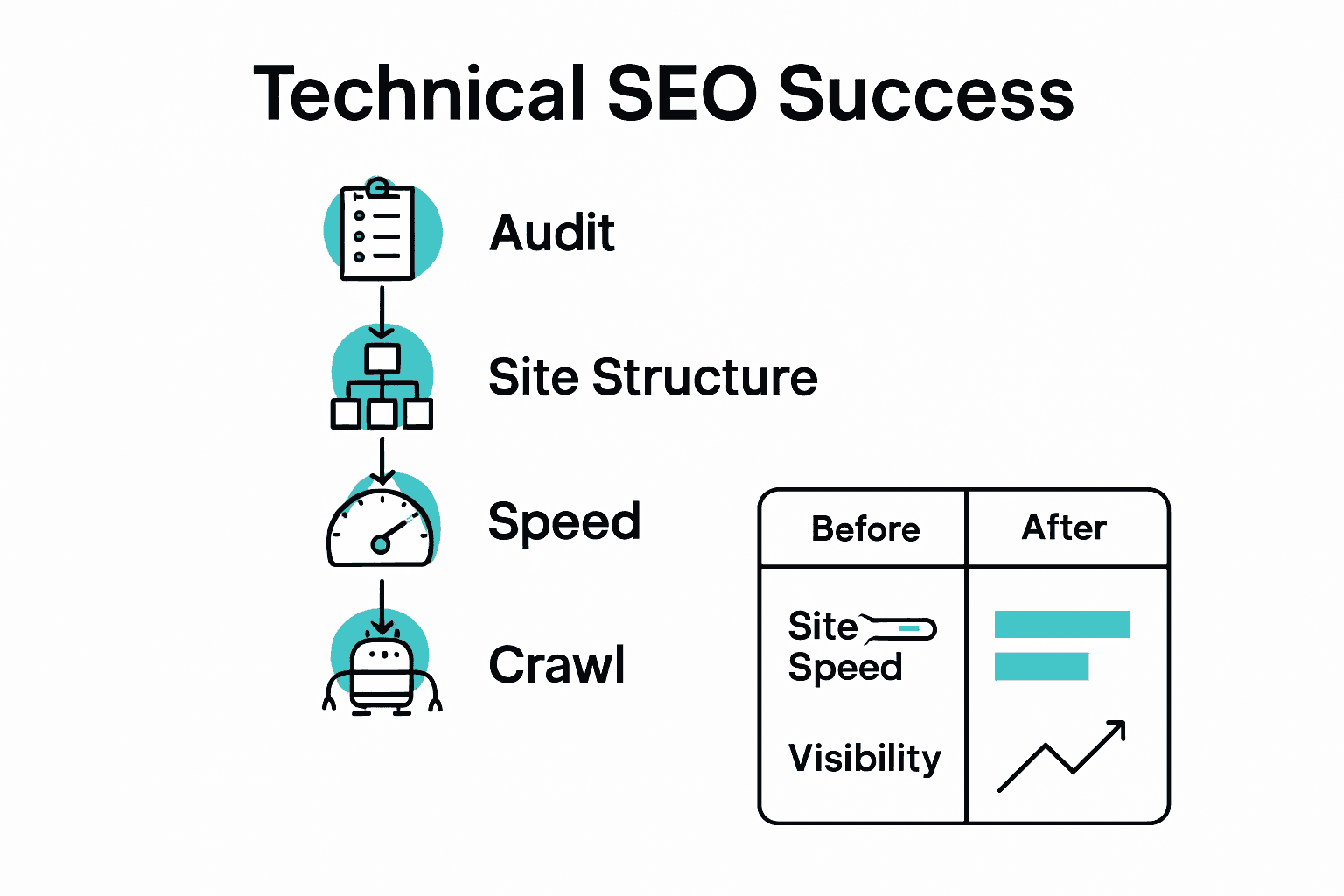
A comprehensive website technical audit helps identify performance bottlenecks and search engine optimization opportunities that could significantly impact your site’s visibility. In this step, you will systematically examine your website’s core technical elements to uncover potential issues preventing optimal search rankings.
Begin by using robust technical SEO diagnostic tools like Google Search Console and specialized crawling software to analyze your website comprehensively. These tools will help you identify critical technical problems such as broken links, slow page load speeds, mobile responsiveness issues, and indexing challenges. Pay special attention to your website’s crawlability by checking for proper XML sitemap configuration, robot.txt files, and ensuring search engine bots can easily navigate your site structure.
Check your website’s core technical health across several key dimensions:
- Page loading speed on desktop and mobile devices
- Mobile responsiveness and adaptive design
- HTTPS security protocols
- Canonical URL configurations
- Proper header tag hierarchies
- Structured data markup implementation
After identifying specific technical issues, prioritize them based on potential impact and complexity of resolution. Some problems like broken links or missing meta descriptions can be quickly fixed, while others might require more extensive site architecture redesign. Technical SEO Checklist to Boost Search Rankings Fast can provide additional guidance for addressing these challenges systematically.
Remember that technical SEO is an ongoing process. Regular audits every 3 to 6 months will help you maintain your website’s optimal performance and search engine compatibility. The insights gained from this audit will form the foundation for your subsequent optimization strategies.
Step 2: Optimize site structure and internal links
Optimizing your website’s site structure and internal linking strategy is crucial for improving search engine visibility and user navigation. This step will help you create a logical, interconnected web of content that both users and search engines can easily understand and traverse.
According to Venture Lab, preventing orphan pages through strategic internal linking is essential for effective website indexing. Start by creating a comprehensive content map that organizes your pages into logical topic clusters. Implement a hierarchical structure where main category pages link to related subcategory and individual content pages. Use descriptive and relevant anchor text that provides clear context about the linked content.
Focus on these key internal linking strategies:
- Create a logical site hierarchy with clear navigation paths
- Use descriptive anchor text that accurately represents linked content
- Ensure each page has multiple internal links from relevant pages
- Link from high-authority pages to important target pages
- Avoid over-optimization by maintaining a natural link distribution
As you develop your internal linking strategy, SEO Siloing Explained: Boosting Site Structure and Rankings can provide additional insights into creating topically relevant content clusters. Regularly audit your internal links to identify and fix broken links, remove unnecessary connections, and ensure your site structure remains clean and intuitive.
Prioritize user experience alongside search engine optimization.
 Your internal linking should feel natural and helpful to readers, guiding them seamlessly through related content while simultaneously strengthening your website’s topical relevance and search engine performance.
Step 3: Improve page speed and mobile usability
Page speed and mobile usability are critical factors that directly impact user experience and search engine rankings. In this step, you will learn how to optimize your website’s performance across different devices and improve overall loading times.
According to University of Wisconsin, technical SEO experts emphasize page speed as a crucial ranking factor. Begin by utilizing tools like Google PageSpeed Insights to analyze your current website performance. Focus on key optimization techniques including image compression, browser caching, and code minification. Reduce large image file sizes, leverage browser caching to store static resources, and eliminate unnecessary JavaScript and CSS code that might slow down your site.
Implement these core mobile and speed optimization strategies:
- Compress and optimize all images before uploading
- Enable browser caching for faster repeat visitor experiences
- Minimize server response times
- Use responsive design that adapts to different screen sizes
- Eliminate render blocking JavaScript and CSS
- Implement lazy loading for images and multimedia content
For advanced performance insights, consider 7 Powerful Advanced SEO Techniques for Higher Rankings to dive deeper into technical optimization strategies. Remember that mobile optimization is not just about speed but also about creating an intuitive and seamless user experience across all devices.
Continuously monitor your website’s performance and be prepared to make ongoing adjustments.
Mobile usability and page speed are dynamic targets that require regular attention and refinement to maintain optimal search engine visibility and user satisfaction.
Step 4: Implement advanced indexing and crawl controls
Advanced indexing and crawl controls are essential for ensuring search engines efficiently discover and understand your website content. This step will help you strategically manage how search engines interact with your website and control which pages get indexed.
According to Social Media Magazine, creating and configuring precise sitemaps and robots.txt files is crucial for effective website indexing. Start by generating a comprehensive XML sitemap that includes all important pages you want search engines to crawl. Use Google Search Console to submit this sitemap and verify your website ownership. Configure your robots.txt file to guide search engine crawlers precisely where to go and what to avoid indexing, preventing unnecessary pages from consuming your crawl budget.
Focus on these key indexing and crawl management strategies:
- Create a detailed and accurate XML sitemap
- Use robots.txt to control search engine crawler access
- Implement meta robots tags for page level indexing control
- Remove low value or duplicate content pages
- Use canonical tags to manage duplicate content issues
- Set up proper URL parameter handling
For deeper insights into technical optimization, explore 7 Powerful Advanced SEO Techniques for Higher Rankings. Monitor your website’s indexing status regularly through Google Search Console, tracking crawl errors and ensuring your most important content remains easily discoverable.
Remember that indexing control is an ongoing process. Regularly review and update your sitemap and robots.txt file to align with your current content strategy and search engine optimization goals.
Step 5: Verify technical SEO improvements
Verifying your technical SEO improvements is a critical final step that ensures all your optimization efforts have been implemented correctly and are delivering measurable results. This process involves comprehensive testing and analysis to validate the effectiveness of your technical SEO strategies.
Utilize multiple diagnostic tools and platforms to conduct a thorough verification of your technical SEO enhancements. Start with Google Search Console to review indexing status, search performance, and potential crawl errors. Cross reference these insights with other tools like SEMrush or Ahrefs to get a comprehensive view of your website’s technical health. Pay close attention to key performance indicators such as organic search rankings, crawl efficiency, mobile usability scores, and page loading speeds.
Implement these critical verification strategies:
- Compare website performance before and after technical optimizations
- Check indexing status across different search engines
- Validate schema markup implementation
- Analyze crawl budget and search engine accessibility
- Review mobile responsiveness across multiple devices
- Monitor core web vitals and page experience metrics
To gain deeper insights into ranking factors and optimization techniques, explore our Complete Guide to SEO Ranking Factors. Remember that technical SEO is an iterative process requiring continuous monitoring and refinement. What works today might need adjustment tomorrow as search engine algorithms and web technologies evolve.
Consider scheduling regular technical SEO audits every 3 to 6 months to ensure your website remains optimized and competitive in search rankings. Consistent verification and proactive optimization will help you maintain and improve your website’s technical performance.
Master Technical SEO and Unlock Your Website’s True Potential
Struggling with complex technical SEO challenges like site crawlability, page speed, or indexing issues can be frustrating and overwhelming. This article breaks down those challenges step by step, helping you understand how to audit your website, optimize internal links, improve mobile usability, and verify your SEO improvements. Don’t let hidden technical errors hold back your search rankings or user experience. Achieving seamless site performance and improved visibility is within your reach.

Ready to take control of your technical SEO and boost your website traffic with proven strategies? Join the free 7-day advanced keyword research academy at wordsatscale.com to learn powerful SEO techniques designed for marketers and bloggers at every level. Explore practical tools and resources that simplify technical SEO processes, from auditing to indexing and speed optimization. Act now to secure your spot and start transforming your website into a high-ranking, user-friendly platform.
Explore more about enhancing your site structure and SEO at SEO Siloing Explained: Boosting Site Structure and Rankings or get advanced insights through 7 Powerful Advanced SEO Techniques for Higher Rankings. Your journey to optimized search performance begins today.
Frequently Asked Questions
What is a technical SEO audit, and how can I conduct one?
A technical SEO audit is a systematic assessment of your website’s technical components to identify issues that could affect search rankings. Start by utilizing tools designed for technical SEO to analyze aspects like page speed, mobile responsiveness, and broken links, and then prioritize fixing these issues based on their impact.
How can I improve my website’s loading speed?
To improve your website’s loading speed, focus on optimizing image sizes, enabling browser caching, and minimizing unnecessary code. Implement these changes to achieve significantly faster load times, ideally reducing your page speed by at least 20% within a few weeks.
What strategies should I use for effective internal linking?
For effective internal linking, create a clear site hierarchy with relevant pages linking to one another. Use descriptive anchor text to guide users and search engines about the content associated with the links, and ensure each page contains multiple internal links to enhance connections throughout your site.
How can I manage indexing and crawling of my website?
Manage indexing and crawling by creating an accurate XML sitemap and configuring your robots.txt file to direct search engines on which pages to index. Update these resources regularly as you add or modify content to ensure only the most relevant pages are crawled by search engines.
How do I verify that my technical SEO improvements are effective?
Verify your technical SEO improvements by using diagnostic tools to compare your website’s performance before and after making changes. Check metrics such as crawl efficiency, mobile usability scores, and page loading speeds to confirm at a glance that your optimizations are having a positive impact.
How often should I conduct a technical SEO audit?
Conduct a technical SEO audit every 3 to 6 months to keep your website in optimal condition. Regular checks will help you maintain performance and adapt to any changes in search engine algorithms, ensuring your site remains competitive.
Recommended
- Technical SEO Checklist to Boost Search Rankings Fast – WordsAtScale
- Why SEO Matters: Complete Guide for Digital Success – WordsAtScale
- SEO for Beginners: Complete Guide to Ranking Success – WordsAtScale
- How to Write SEO-Friendly Content for Top Rankings – WordsAtScale
- 10 Schritte für eine optimale Website: Checkliste für Website-Optimierung – Onlinemarketing360
- 7 Key SEO Checkpoints for WordPress Success – WPoptic